Project variables
A project variable is a named value defined at project scope, with optional per-environment overrides and an optional secret flag that encrypts the value. Project variables are the single source of truth for any pipeline value that varies between environments (such as develop vs production) or has to be kept private (such as API keys and database passwords).
Define a value once on the project, give each environment its own value when needed, optionally mark it as a secret, and Quix resolves the right value at deployment time.
YAML Variables and Secrets Management are deprecated
Project variables replace two earlier features:
- YAML Variables — per-environment
{{ }}substitutions inquix.yaml. - Secrets Management — the separate encrypted store for credentials.
Both are deprecated. Their URLs (deploy/yaml-variables.html, deploy/secrets-management.html, and the same paths under quix-cloud/deployments/) now redirect here, and the standalone UI panels they had have been replaced by the single Project variables panel.
Existing projects keep working — the legacy YAML shapes are still accepted on read and continue to resolve. New work should use the project-variable patterns described on this page. See Why we deprecated Secrets and YAML variables for the rationale, and Backward compatibility for the YAML migration table.
When to use a project variable
Use a project variable whenever a value needs at least one of:
- A different value per environment. Common for resource sizing, public URL prefixes, feature toggles, and any external endpoint that differs between
develop/staging/production. - Encryption. Common for API keys, database passwords, OAuth client secrets, third-party tokens.
- Reuse across multiple deployments. One variable, many references — change the value in one place and every deployment picks it up on next sync.
If none of those apply — for example, a hard-coded topic name that never varies — a literal value: in quix.yaml is fine.
How Quix resolves a project variable
flowchart LR
    A[Project variable<br/>defined in panel] --> B{Per-env value?}
    B -- yes --> C[Environment value]
    B -- no --> D[Default value]
    C --> E{Referenced in<br/>quix.yaml?}
    D --> E
    E -- "{{ NAME }}" --> F[Substituted into<br/>YAML field at sync]
    E -- "inputType:<br/>ProjectVariable" --> G[Injected as<br/>container env var]
    E -- no --> H[Never reaches<br/>the deployment]
    F --> I[Sync &<br/>deploy]
    G --> I
Key facts the diagram encodes:
- Per-environment override > default value. If the environment has its own value, that wins. Otherwise the default applies.
- Defining a project variable does not expose it. A variable reaches a deployment only when
quix.yamlexplicitly references it (either pattern). - Substitution happens at sync time. Templated values are resolved when an environment is synced and the resolved literal lands in the rendered pipeline.
- Binding happens at deployment runtime. Application variables of
inputType: ProjectVariableare resolved when the deployment starts, so the secret value never lands in YAML.
Create a project variable
Project variables live on a dedicated Project variables panel attached to the project. The panel is the same across every environment in the project — environments share the variable definitions and only differ in the values they assign.
-
From your project, open the
Project variablespanel.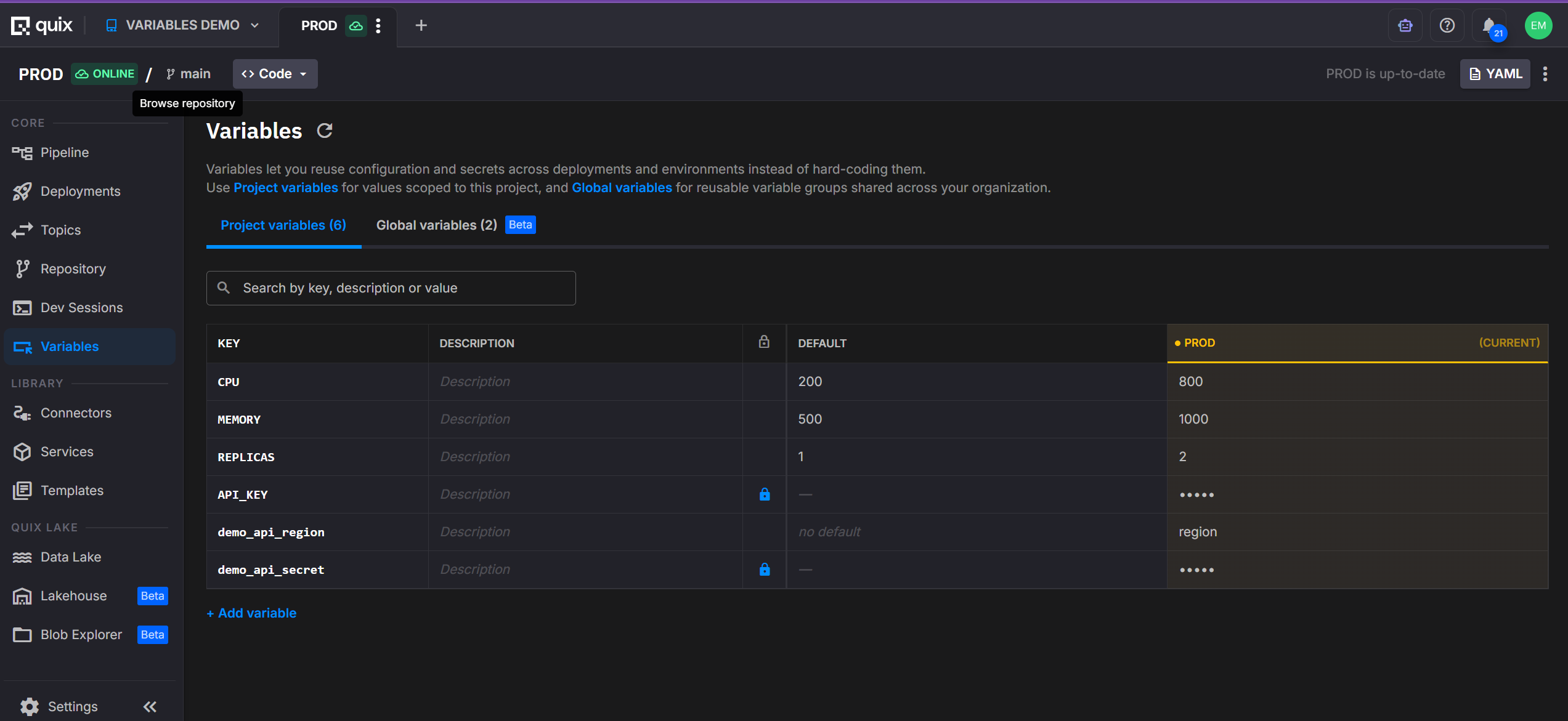 2. Click
 + New variable. 3. Give the variable aName. The name is the key you reference inquix.yamland from your application code. Use uppercase letters, digits, and underscores starting with a letter or underscore so the name maps cleanly to a container environment variable. 4. Set the variable'sDefault value. The default applies to every environment that does not provide its own value, and is the fallback when a new environment is later created. 5. For any environment that needs a different value, set a per-environment override. The override replaces the default for that environment only; other environments continue to use the default.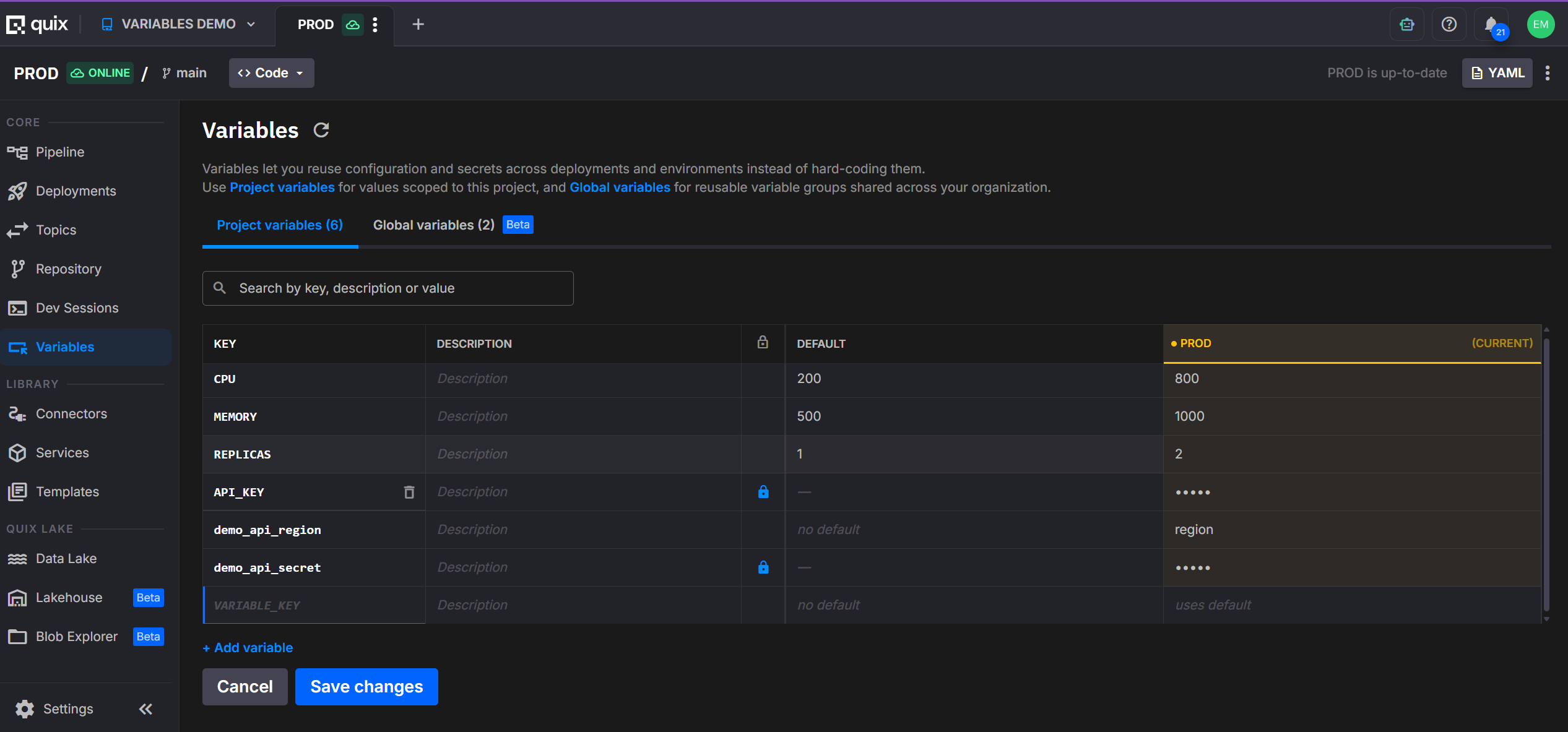 6. To store the value securely, enable the
 Secrettoggle. Encryption applies to both the default and every per-environment override, and the value is hidden in the UI, the YAML view, and Git.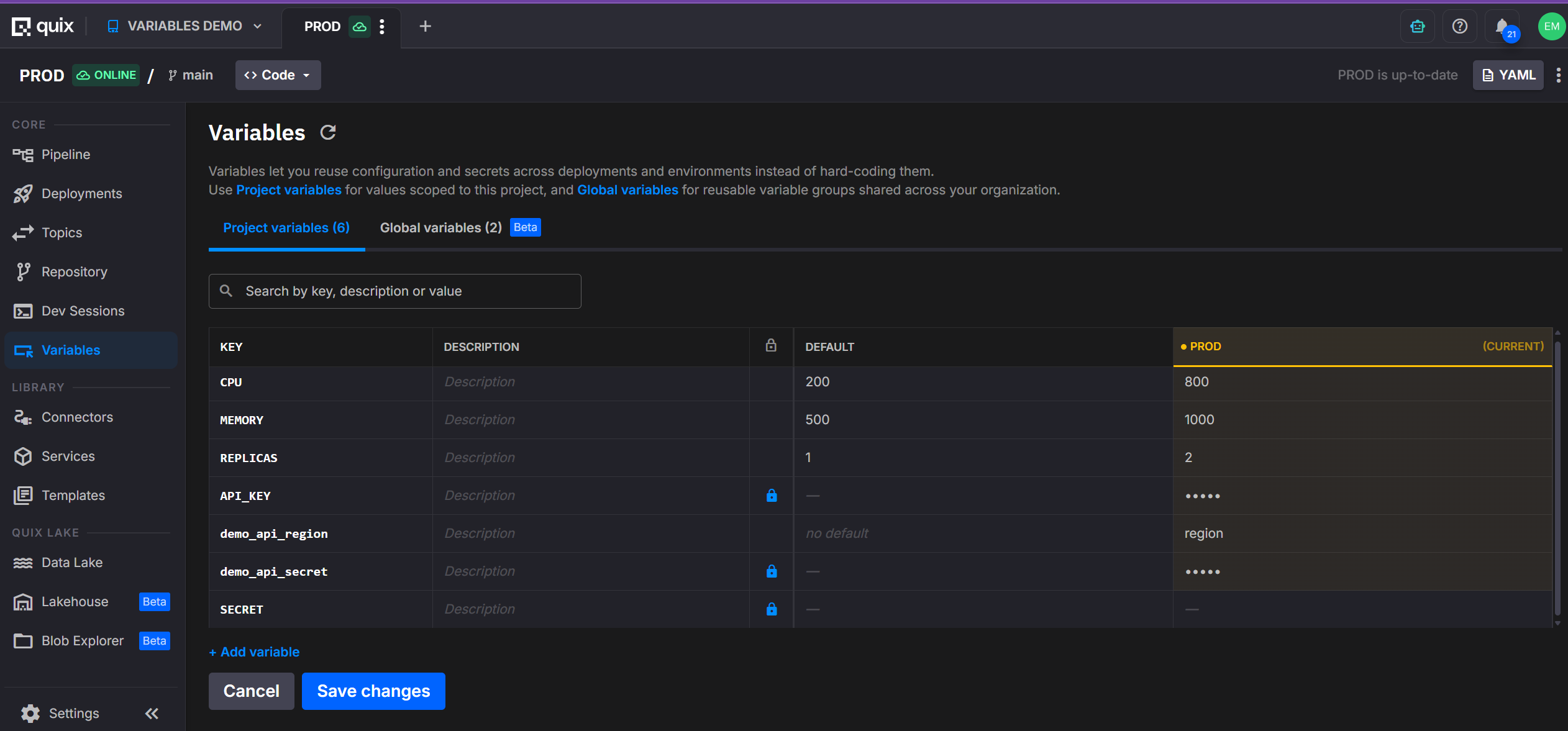 7. Click
 Save changes.
Settings menu shortcut
Settings → Project variables opens the same panel from anywhere in the project. This entry replaces the legacy Settings → Secrets management entry.
Pattern 1 — Substitute into a quix.yaml field
Wrap the variable name in double curly braces to substitute the resolved value of a project variable directly into a quix.yaml field. The substitution happens at sync time, so the value becomes part of the rendered pipeline configuration.
Use this pattern for fields that need to vary per environment but don't need to be secret — resource sizing, public URL prefixes, feature toggles.
Before — hard-coded resources:
After — per-environment values:
Disabling a deployment per environment:
Concatenating multiple variables in one string:
Secrets cannot be referenced with {{ }}
{{ }} substitution embeds the resolved value into the rendered quix.yaml, which is stored in Git. If you reference a project variable that has Secret enabled, the sync fails with an error such as:
Secret project variables ('MY_SECRET') cannot be referenced via {{ }} template syntax. Use inputType: ProjectVariable with variableKey instead.
Use Pattern 2 (below) to pass a secret to a deployment. Pattern 2 resolves at runtime — the value never lands in YAML.
Pattern 2 — Bind to a container environment variable
To pass a project variable to your application as an environment variable, declare the application variable with inputType: ProjectVariable and set variableKey to the name of the project variable. The value resolves at deployment runtime and is injected directly into the container, never into the rendered YAML.
Use this pattern for any value your application code reads from os.environ (or the equivalent). Required for secrets, recommended for any binding that doesn't need to vary the structure of quix.yaml itself.
deployments:
- name: my-service
application: My Service
variables:
- name: API_KEY # (1)!
inputType: ProjectVariable # (2)!
description: Third-party API key
required: true
variableKey: THIRD_PARTY_API_KEY # (3)!
secret: true # (4)!
- The name of the environment variable as it appears inside the running container. Your code reads this.
- Tells Quix to resolve the value from a project variable instead of using a literal
value:field. - The key of the project variable to read. Resolution is per-environment at deployment time.
- Optional hint that the referenced project variable is a secret. It must match the variable's
Secretflag in the panel (a mismatch fails the sync — see Validation errors); the portal writes it for you. Omit it for a non-secret variable, or setsecret: false.
The application receives an environment variable named API_KEY whose value is the project variable THIRD_PARTY_API_KEY in the current environment. Mark THIRD_PARTY_API_KEY as Secret in the project variables panel to encrypt the value at rest and keep it out of YAML.
quix.yaml or app.yaml? (the field name differs)
The binding above is on a deployment in quix.yaml, where the project-variable key goes in variableKey. You can also declare the same binding on the application in app.yaml, so it travels with the app to every deployment — but the application descriptor names the field defaultValue instead of variableKey:
# app.yaml — on the application; the project-variable key goes in `defaultValue`
variables:
- name: API_KEY
inputType: ProjectVariable
defaultValue: THIRD_PARTY_API_KEY
required: true
secret: true
The portal writes app.yaml in this form when you add an application variable in the UI. A deployment of the app then inherits this binding — see Inheriting variables from app.yaml for how that works and when a deployment overrides it.
Access the value from your application code
A project variable bound via Pattern 2 arrives in the container as a standard environment variable. Read it with the language's normal environment-variable API.
Related concept — Variable groups
When a set of related values is shared across multiple projects — for example, the host, port, and token of a database every service connects to — define them once as organization-scoped global variables and bundle them into a variable group. A deployment then pulls in the whole group with a single reference:
variables:
- name: DB
inputType: VariableGroup
description: Database connection
required: true
variableGroupId: production-db
variableGroupName: Production DB
variableGroupDescription: Shared database connection
inputType: VariableGroup resolves at runtime like inputType: ProjectVariable, but the values come from an organization-scoped variable group rather than this project's variables. Use project variables for values local to one project; use a variable group when the same set is shared across projects. See Global variables for the full feature.
Validation errors and the missing-values flow
When you sync an environment, Quix validates every project-variable reference. These error kinds can be reported:
| Error | Cause | Fix |
|---|---|---|
| Missing reference | A deployment variable (inputType: ProjectVariable) or a {{ }} template references a key that does not exist as a project variable in this environment. |
Create the variable, or remove/rename the reference. |
| Type mismatch | A {{ }} template resolves to a value that cannot be converted to the field's expected type. For example, replicas expects an integer; the resolved value is "two". |
Set a value of the correct type for that environment. |
| Secret in template | A {{ }} template references a project variable that has Secret enabled. |
Switch to Pattern 2 (inputType: ProjectVariable + variableKey). |
| Secret mismatch | A deployment variable declares a secret: value in quix.yaml that contradicts the stored project variable's Secret flag. |
Align the YAML secret: hint with the variable, or drop the hint and let the stored flag apply. |
If the target environment is missing required values, Quix blocks the sync and opens the Missing project variables dialog. The dialog explains: "The YAML references project variables that aren't defined yet. Add them before launching the sync into the [environment] environment." and lists the missing keys.
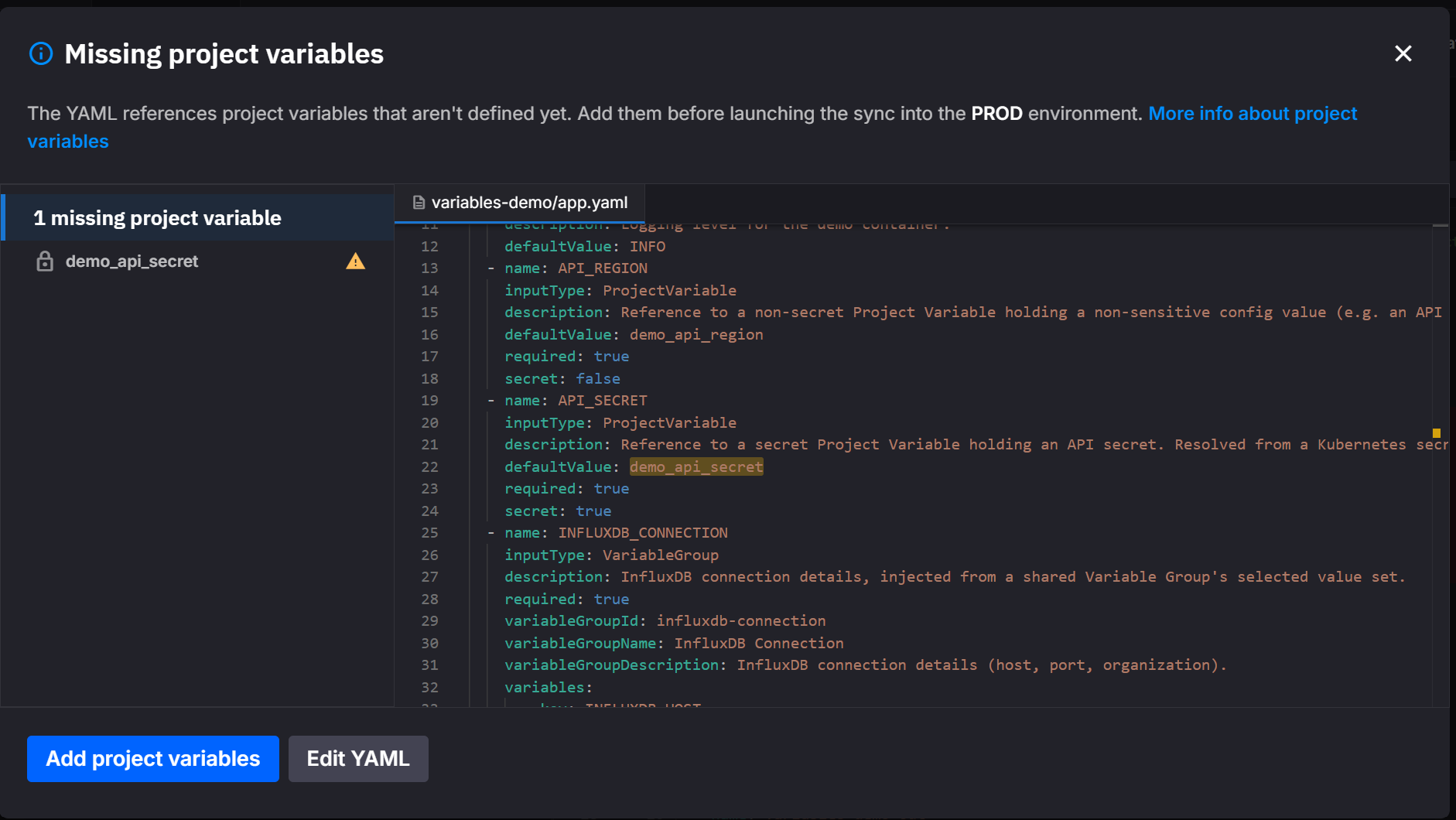
From this dialog you can:
- Click
Add project variablesto provide the missing values inline. - Click
Edit YAMLto openquix.yamland remove or rename the offending references instead.
The deployment does not start until every referenced project variable has a value for the target environment.
Recipes
Common configuration tasks and the exact shape to use.
Scale resources per environment
Goal — develop runs small, production runs big, same quix.yaml.
- In
Project variables, createCPU,MEMORY,REPLICASwith environment values200 / 500 / 1indevelopand800 / 1000 / 2inproduction. - In
quix.yaml:
deployments:
- name: my-service
resources:
  limits:
    cpu: {{CPU}}
    memory: {{MEMORY}}
  replicas: {{REPLICAS}}
- Sync each environment to apply.
Inject a secret API key into a Python service
Goal — your code calls a third-party API; the key must never appear in Git.
- In
Project variables, createTHIRD_PARTY_API_KEY, enable theSecrettoggle, and set the per-environment values. - In
quix.yaml, bind it to a container env var:
variables:
- name: API_KEY
inputType: ProjectVariable
required: true
variableKey: THIRD_PARTY_API_KEY
secret: true
- In
main.py:
Disable a deployment in selected environments
Goal — a debugging service runs in develop only.
- In
Project variables, createDEBUG_DISABLEDwith defaulttrueand overridefalseindevelop. - In
quix.yaml:
Compose a per-environment public URL
Goal — develop exposes myapp-develop.quix.io, production exposes myapp-production.quix.io.
- In
Project variables, createURL_PREFIXwith defaultmyapp, andENV_NAMEwith per-environment valuesdevelop/production. - In
quix.yaml:
Inject a database connection (multiple related values)
Goal — host, port, and token all need to be available, all per-environment, and the token must be encrypted.
- In
Project variables, createDB_HOST,DB_PORT, andDB_TOKEN(withSecretenabled), each with per-environment values. - In
quix.yaml, bind each one:
variables:
- name: DB_HOST
inputType: ProjectVariable
variableKey: DB_HOST
- name: DB_PORT
inputType: ProjectVariable
variableKey: DB_PORT
- name: DB_TOKEN
inputType: ProjectVariable
required: true
variableKey: DB_TOKEN
secret: true
- In your code:
Shared across projects?
If the same database is used by several projects, define these as an organization-scoped global variable group instead and inject all three with a single reference. See Global variables.
Inheriting variables from app.yaml
From descriptor version 2.0, an application's variables are defined once in its app.yaml, and every deployment of that application inherits them — quix.yaml does not redeclare them.
app.yamlis the source of truth. It declares each variable'sinputType,description,required, and value or key (defaultValue). A deployment that references the application byapplication+versionpicks up the whole set. The portal writesapp.yamlfor you when you add an application variable in the UI.quix.yamlrecords only overrides. A deployment lists a variable only to change a property for that deployment — a different value or key. Anything left at the application default is omitted, so a deployment that uses every default has novariables:block at all (see the full example). On write-back (after a sync or deployment update) the platform strips properties that match the app, keepingquix.yamlminimal.- To override one deployment, declare just that variable in its
variables:block with the changed property; the rest stays inherited.
The same variable uses a different field name on each side:
| Concept | app.yaml (define once) |
quix.yaml deployment (override only) |
|---|---|---|
| Plain value | defaultValue: cpu-load |
value: cpu-load |
| Project-variable key | defaultValue: THIRD_PARTY_API_KEY |
variableKey: THIRD_PARTY_API_KEY |
| Variable-group reference | variableGroupId: redis-config |
variableGroupId: redis-config |
| Secret flag | secret: true |
secret: true (inherited) |
For example, an app.yaml default of defaultValue: info on a LOG_LEVEL variable is inherited by every deployment. To run one deployment at debug, that deployment alone adds the override:
Every other deployment keeps inheriting info, and LOG_LEVEL stays absent from their blocks.
Inheritance applies to deployments that reference an application + version; managed services don't inherit. See YAML 1.0 and 2.0 for the full inheritance and resolution model, including what the platform stores versus what it computes.
Full example
The two files below show this together — app.yaml defines the variables, and the quix.yaml deployment inherits them while using {{ }} only for the per-environment pipeline fields it substitutes (resources, the public URL).
app.yaml — in the application folder, defines the application's variables:
name: Starter transformation
language: python
variables:
- name: input
inputType: InputTopic
description: Name of the input topic to listen to.
required: false
defaultValue: cpu-load
- name: output
inputType: OutputTopic
description: Name of the output topic to write to.
required: false
defaultValue: transform
- name: API_KEY
inputType: ProjectVariable
description: Third-party API key
required: true
defaultValue: THIRD_PARTY_API_KEY
secret: true
dockerfile: build/dockerfile
runEntryPoint: main.py
quix.yaml — the pipeline; the deployment references the application, inherits the variables above, and substitutes per-environment values into its fields:
# Quix Project Descriptor
metadata:
version: 2.0
deployments:
- name: CPU Threshold
application: Starter transformation
version: latest
deploymentType: Service
resources:
limits:
cpu: {{CPU}}
memory: {{MEMORY}}
replicas: {{REPLICAS}}
disabled: {{DISABLED}}
publicAccess:
  enabled: true
  urlPrefix: {{URL_PREFIX}}-{{ENV_NAME}}
# input, output, and API_KEY are inherited from the application's app.yaml
In this example:
CPU,MEMORY,REPLICAS,DISABLED,URL_PREFIX, andENV_NAMEare project variables substituted into the deployment's fields with{{ }}at sync time — sodevelopcan run small andproductionlarge with no YAML change.input,output, andAPI_KEYare application variables defined inapp.yaml; the deployment inherits them, so they don't have to be repeated inquix.yaml.API_KEYbinds to the project variableTHIRD_PARTY_API_KEY. Withsecret: trueand the variable marked secret in the panel, the value resolves at runtime and never lands in YAML.
See the Pipeline YAML reference for the complete schema.
Sync workflow
After you change project variables or update quix.yaml, the affected environment may enter an out-of-sync state. To apply the changes:
- Update project variables and
quix.yamlin your development environment, and sync. - Merge the changes into the production environment.
- Sync the production environment.
Once synced, confirm the resolved values match what you expect for each environment. The same {{CPU}} placeholder can produce 200 in develop and 800 in production, depending on the per-environment values you defined.
Why we deprecated Secrets and YAML variables
Problem 1 — Two stores, two mental models
YAML Variables and Secrets Management were two separate stores. Project variables unify the store while keeping how you use each — the behavior is the same, there's just one store now instead of two:
| Was | What it did | In project variables |
|---|---|---|
| YAML Variables | Per-environment values substituted into quix.yaml with {{ }} placeholders — CPU, memory, replicas, public URLs, feature toggles. |
The same {{ }} substitution (Pattern 1), now reading from the unified store. |
| Secrets Management | An encrypted store for credentials, bound to an application's environment variable. | The same runtime binding (Pattern 2) plus a per-variable Secret flag, from the same store. |
Both usage patterns carry over unchanged — the substitution still substitutes, the binding still binds. What's gone is the second store and the need to choose between two systems when their uses overlapped. A single store now holds per-environment values, and a Secret flag turns on encryption per variable; existing {{ }} references and secret bindings keep resolving exactly as before.
Problem 2 — Configuration scattered across many places
Pipeline configuration used to live in three places at once: hard-coded literals in quix.yaml, free-text values in each application's variables list, and entries in the secrets store. Changing one value often meant editing several places.
Project variables centralize the source of truth: one named value in one panel, referenced from quix.yaml wherever it's needed.
Problem 3 — Credentials in version control
Hard-coding credentials in quix.yaml (or any committed file) put them in Git history. The legacy inputType: Secret pattern existed to avoid this, but it only worked for a subset of usage.
Project variables marked Secret are encrypted at rest, hidden in the UI, hidden in the YAML view, and never written into committed files — for both substitution-style and binding-style references.
Backward compatibility
The deprecated YAML shapes from Secrets Management are still accepted on read — existing projects keep working without changes. Use the modern shapes for any new work:
| Deprecated YAML | Replace with |
|---|---|
inputType: Secret |
inputType: ProjectVariable |
secretKey: MY_KEY |
variableKey: MY_KEY |
Both forms resolve identically. Whenever the platform writes app.yaml or quix.yaml back to your repository (for example, after a sync or a deployment update), it emits the modern form. No manual migration of YAML files, project values, or secrets is required — values you previously stored as YAML Variables or Secrets are preserved as project variables, and any {{ }} substitution references in your quix.yaml continue to resolve as before.
Reference summary
A condensed reference for tools and integrations that consume this page.
quix.yaml variable fields
A binding-style reference (inputType: ProjectVariable) is an entry in a deployment's variables: block — distinct from the {{ }} substitution form (Pattern 1), which has no such entry:
| Field | Required | Type | Meaning |
|---|---|---|---|
name |
yes | string | The environment-variable name injected into the container. Your code reads this. |
inputType |
yes | string | Must be ProjectVariable to bind to a project variable. |
variableKey |
yes | string | The key of the project variable to read. Resolved per-environment at deployment runtime. |
description |
no | string | Human-readable description, shown in the UI and error messages. |
required |
no | boolean | When true, the deployment fails to deploy if the variable cannot be resolved. |
secret |
no | boolean | Hint that the referenced variable is a secret. Must match the variable's stored Secret flag or the sync raises Secret mismatch. |
app.yaml variable fields
On an application in app.yaml, the same binding uses the same fields — except the project-variable key goes in defaultValue instead of variableKey:
| Field | Required | Type | Meaning |
|---|---|---|---|
name |
yes | string | The environment-variable name injected into the container. |
inputType |
yes | string | Must be ProjectVariable to bind to a project variable. |
defaultValue |
yes | string | The key of the project variable to read — the app.yaml equivalent of quix.yaml's variableKey. |
description |
no | string | Human-readable description. |
required |
no | boolean | When true, the deployment fails to deploy if the variable cannot be resolved. |
secret |
no | boolean | Hint that the referenced variable is a secret; must match the variable's stored Secret flag. |
- Storage — a project variable is a
(key, default value, per-environment values, secret flag)record at project scope. One store backs both substitution-style and binding-style references. - Substitution pattern —
{{ NAME }}in anyquix.yamlfield. Resolved at sync time. Rejected for variables withSecretenabled. - Binding pattern —
inputType: ProjectVariablewith the project-variable key invariableKey(quix.yaml) ordefaultValue(app.yaml); see the field tables above. Resolved at deployment runtime. Required for secrets. - Secret hint — an optional
secret: true|falseon the binding records whether the referenced variable is a secret. It must match the variable's storedSecretflag or the sync raisesSecret mismatch. - Group pattern —
inputType: VariableGroup+variableGroupId: <group>references an organization-scoped variable group (a named bundle of global variables), not a project variable. - Resolution order — per-environment value > default value.
- Validation errors —
Missing reference,Type mismatch,Secret in template,Secret mismatch. Surface in theMissing project variablesdialog at sync time. - Encryption —
Secretflag encrypts both default and per-environment values at rest and hides them from UI, YAML view, and Git. - Migration — legacy
inputType: Secret/secretKey:shapes are accepted on read and rewritten to the modern shapes on write.
Related documentation
- How to add environment variables — UI walkthrough for the per-deployment
+ Adddialog. - Quix variables — Reference for environment variables that Quix injects into every deployment.
- Application YAML reference — variable input types — Full list of
inputTypevalues. - Pipeline YAML reference (
quix.yaml) — Full schema for the pipeline descriptor.
.png)