Global variables
Beta feature
Global variables are currently in beta. The portal labels the feature with a Beta badge in the sidebar; behavior and UI labels may still change before general availability.
Global variables let you define configuration once, at the organization level, and reuse it across many projects and environments. A deployment pulls in a whole set of these variables with a single reference, and you update the value in one place instead of editing every project that uses it.
The problem they solve
Without global variables, configuration that is shared by several projects has to be duplicated into each one. A typical example is a Redis cluster used by five different services:
- You copy
REDIS_HOST,REDIS_PORT, andREDIS_PASSWORDinto all five projects, and into each environment (develop,production) of every project. - When the password rotates, you edit the value in 5 projects × 2 environments = 10 places. Miss one and that service breaks.
- Adding a new setting (say
REDIS_DB_INDEX) means touching every project again. - There is no single source of truth — the values drift apart over time.
Global variables remove the duplication:
- Define the Redis configuration once as a group, with a value set per environment (
DEV,PROD). - Each project assigns the group and picks which value set each environment uses.
- Rotating the password is a single edit that reaches every project and environment that consumes the group.
- Adding
REDIS_DB_INDEXto the group makes it available everywhere — no change to any project'squix.yaml.
With global variables, one group is the single source of truth that every project draws from — so a change is made once, not copied into each project:
flowchart LR
    G["redis-config group<br/>DEV / PROD value sets<br/>edit once"]
    G --> A["Project A"]
    G --> B["Project B"]
    G --> C["Project C"]
How global variables are organized
Global variables is the organization-scoped feature as a whole — not a single value. A value is built from three pieces:
| Term | What it is |
|---|---|
| Variable group | A named, organization-level container of related variables — for example redis-config. It has an immutable identifier (used in quix.yaml), a display name, and an optional description. It is the unit a project assigns. |
| Value set | A named variant within a group — for example DEV and PROD. Every variable in the group holds one value per value set, so the same group supplies different values in different environments. |
| Variable | A key/value pair inside a group (a row under the group's Variables tab). Its name becomes the environment-variable name injected into the container. It can be marked secret, in which case the value is encrypted at rest and hidden in the UI, the YAML view, and Git. |
flowchart LR
    G["Variable group<br/>redis-config"]
    G --> VS1["Value set: DEV"]
    G --> VS2["Value set: PROD"]
    VS1 --> V1["REDIS_HOST = dev.redis.local"]
    VS1 --> V2["REDIS_PASSWORD = dev-pw"]
    VS2 --> V3["REDIS_HOST = prod.redis.example.com"]
    VS2 --> V4["REDIS_PASSWORD = prod-pw"]
A project consumes a group through an assignment, and a group can be assigned at two levels that coexist:
- A project-level assignment picks the value set used by every environment in the project. In the
Global variablestab this is theDefaultcolumn. - An environment-level assignment sets the value set for a single environment, overriding the default. Each environment has its own column in that tab.
Where both exist, the environment-level assignment wins; an environment with no assignment of its own falls back to the project-level Default.
One reference injects the whole group
A deployment references a group once in quix.yaml, and Quix injects every variable in the resolved value set as separate environment variables. You never list the individual variables — and adding a variable to the group later reaches every deployment that already references it, with no YAML change. See Reference a group in quix.yaml.
When to use global variables
Reach for global variables when the same configuration is consumed by more than one project, or when you want one place to manage a related set of values across environments. Concretely:
- Shared infrastructure — a database, cache, message broker, or object store that several services connect to.
- Shared third-party credentials — one API key used by every service that calls a given provider.
- Centralized rotation — you want to change a value once and have it land everywhere automatically.
- Grouped configuration — a set of related settings you would rather manage as a unit than as scattered individual variables.
Use a different mechanism when the configuration belongs to a single project:
flowchart TD
    A{Is the value shared<br/>across projects?} -->|Yes| G[Global variables]
    A -->|No| B{Static value for<br/>one deployment?}
    B -->|Yes| E[Environment variables]
B -->|"No — per-environment<br/>or a secret"| C[Project variables]| You want to… | Use |
|---|---|
| Share config across multiple projects | Global variables |
A per-environment value or a secret within one project (CPU, MEMORY, REPLICAS, API keys) |
Project variables |
| Set a static value on one deployment | Environment variables |
| Read a platform-provided identifier | Quix variables |
Global variables vs project variables
Both can hold per-environment values and secrets, so the deciding factors are scope and shape:
- Scope — project variables belong to one project; global variables are organization-wide, shared by every project that assigns the group.
- Grouping — global variables come bundled in a group of related keys; a project variable is a single value.
- Injection — one
inputType: VariableGroupreference injects every variable in the group at once; a project variable is bound one key at a time (inputType: ProjectVariable+variableKey).
Use project variables for values a single project owns; reach for a global variable group when the same set of values is shared across projects and you want to define, rotate, and inject them together.
How it works end to end
Setting up and consuming global variables is four steps, split between an organization admin and a project developer:
sequenceDiagram
    participant Admin as Org admin
    participant Group as Variable group
    participant Dev as Project developer
    participant Deploy as Deployment
    Admin->>Group: 1. Create group + value sets
    Admin->>Group: 2. Add variables (values per set)
    Dev->>Group: 3. Assign group to project,<br/>pick value set per environment
    Dev->>Deploy: 4. Reference group in quix.yaml
    Deploy-->>Deploy: On deploy: all group vars<br/>injected as env vars
The rest of this page walks through each step.
Set up a variable group
(Organization level — Global Variables in the organization sidebar.)
Create the group
-
In the Quix Cloud portal, open the organization sidebar and select
Global Variables.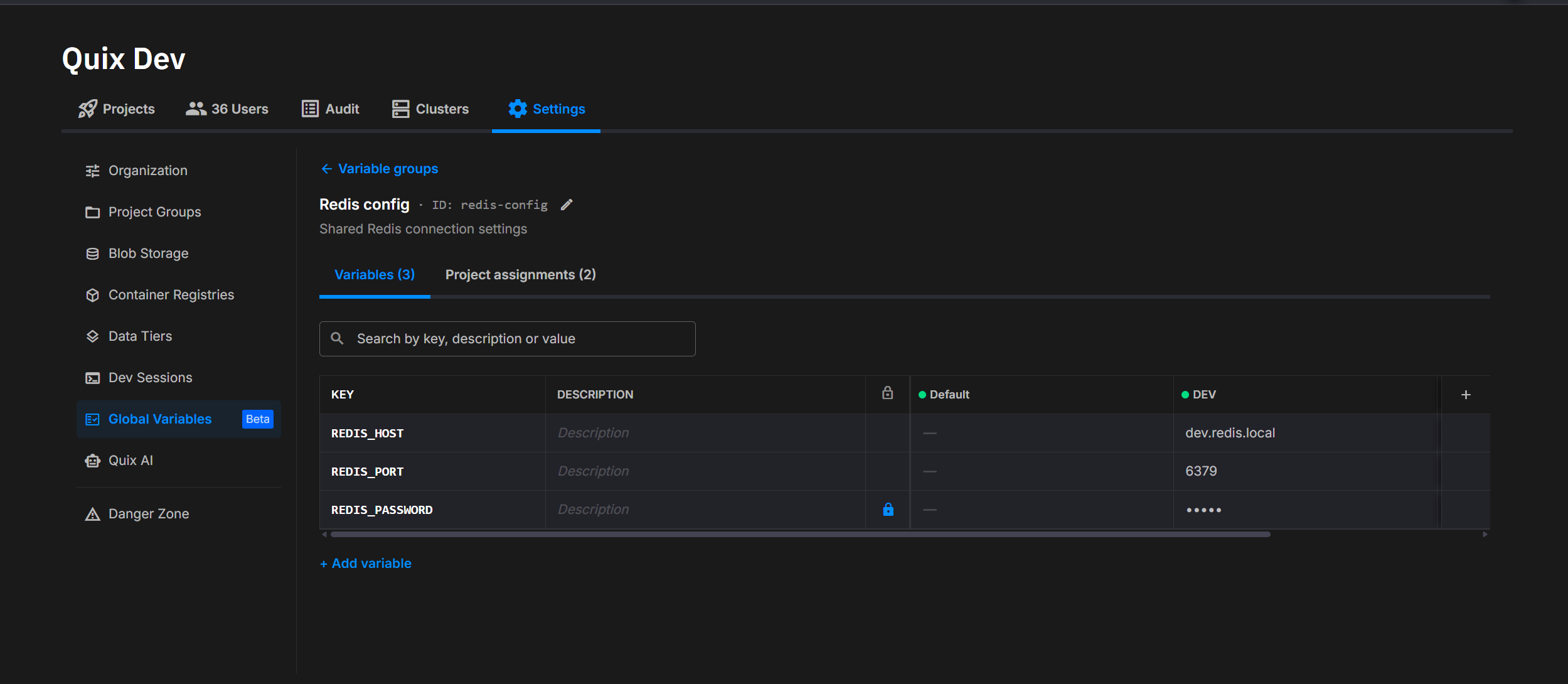
-
Click
New variable group. - Enter an identifier, a display name, and an optional description. The identifier is what you reference in
quix.yamland cannot be changed after creation. It accepts letters, digits, hyphens, and underscores (up to 254 characters) and must start with a letter or digit. Identifiers are compared case-insensitively when checking for duplicates, soredis-configandRedis-Configcannot both exist. - Add one or more value sets, for example
DEVandPROD. - Click
Save.
Creator override
The user who creates a group can update it, add value sets, and manage its assignments even if their role lacks the general Update permission. The override does not cover deletions: deleting the group still requires the Delete permission, and deleting a value set requires the Update permission. Reading and creating groups also require the standard permissions.
Add variables
- Open the group from the
Global Variableslist. - Add a row to the variables grid.
- Enter the variable name. This becomes the environment-variable name in the container, so it must follow OS conventions: no spaces; we recommend
[a-zA-Z_][a-zA-Z0-9_]*. The same name applies across every value set. - Enter a value for each value set — for example a development value and a production value.
- To protect the value, toggle
Secret. Secret values are encrypted at rest and hidden in the UI, the YAML view, and Git. - Save the row.
Editing a value updates every project and environment that resolves against that value set.
Turning a secret back into a plain value
You can clear the Secret toggle to make a variable plain again, but you must enter a new value in the same edit. A demotion with no new value is rejected — the platform never exposes the stored encrypted value as plaintext.
Assign a group to a project
(Project level — Variables in the project sidebar → Global variables tab.)
A project must assign a group before any of its deployments can reference the group's variables.
-
Open your project, select
Variablesin the sidebar, and switch to theGlobal variablestab. (The siblingProject variablestab holds this project's own variables.)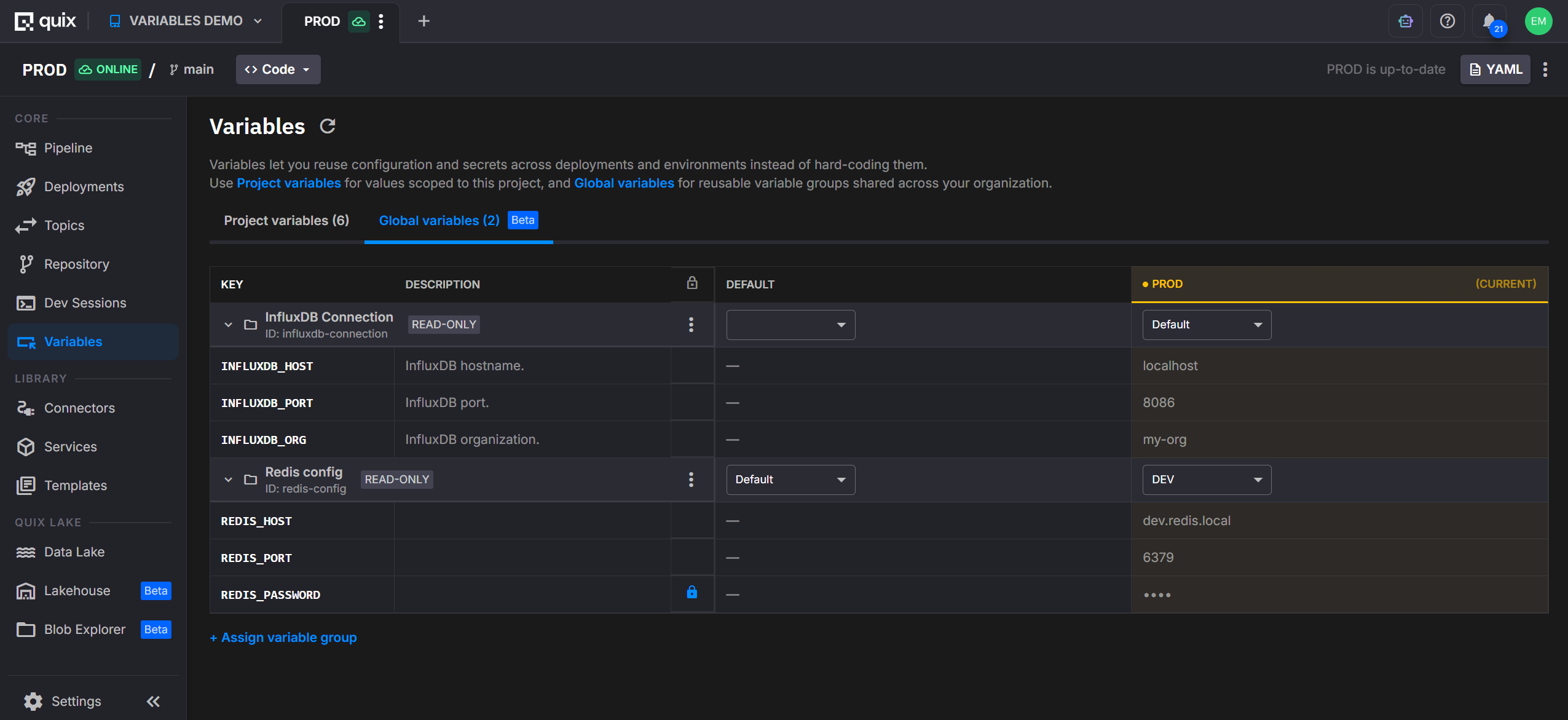
-
Click
Assign variable group. (If the group does not exist yet, the empty state also offersCreate new group, which opens the org-level dialog.) - In the dialog, pick the group, then the default value set for this project. The dialog orders its fields to match where you started: from the project, the project and environment are already filled in; from
Global Variablesat the org level, you pick the project and environment instead. - Save the assignment.
The project now resolves every variable in the group against the chosen value set.
Note
The groups offered in the assignment dialog are gated by your role's permissions on global variables. Ask an organization admin if a group you expect is missing.
Override the value set per environment
The Global variables tab lists each assigned group as a row, with a Default column (the project-level assignment) and a column for each environment. The Default value set applies to every environment that doesn't have its own. To make one environment use a different value set:
- In the group's row, open the value set dropdown for the environment you want to change (not the
Defaultcolumn). -
Pick a different value set — for example
PROD.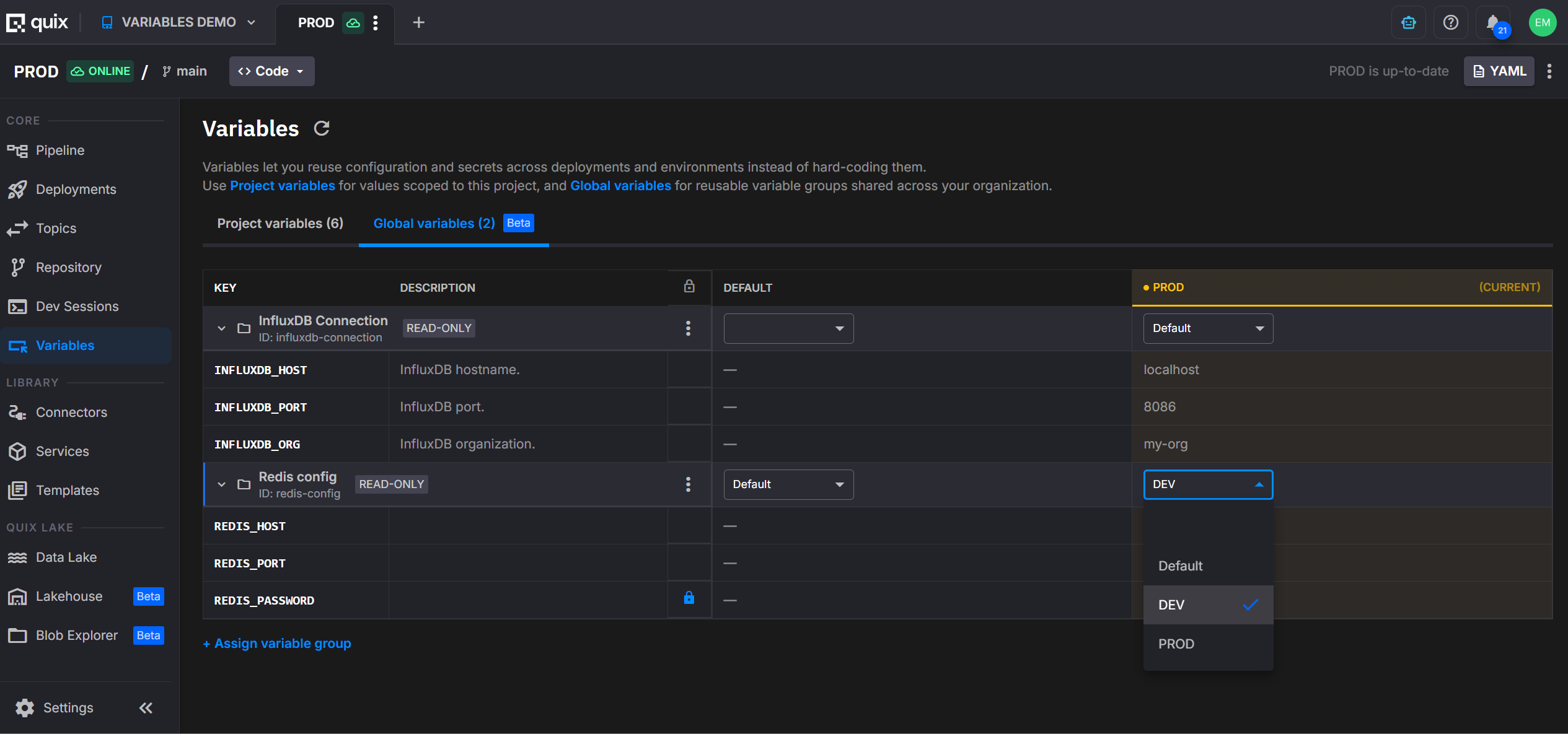
That environment now uses its own value set; the others keep following the Default. Clearing an environment's selection makes it fall back to the Default again.
Reference a group in quix.yaml
A deployment references a group by adding one entry under variables with inputType: VariableGroup and the group's identifier in variableGroupId:
deployments:
  - name: Order processor
    application: order-processor
    deploymentType: Service
    variables:
      - name: redis                 # label only — not injected
        inputType: VariableGroup
        variableGroupId: redis-config
        required: true
At deploy time, Quix resolves the group against the value set currently assigned to the environment and injects every variable in that value set as a separate environment variable. If redis-config contains REDIS_HOST, REDIS_PORT, and REDIS_PASSWORD, all three appear in the container.
Two things to keep in mind:
- One reference, many env vars. You do not list the individual variables. Adding a variable to the group later reaches this deployment automatically on the next sync.
- The
namefield is a label. It identifies the reference in the UI and in error messages but is not injected. The injected names come from the variables defined inside the group.
To pull in more than one group, add one entry per group:
variables:
  - name: redis
    inputType: VariableGroup
    variableGroupId: redis-config
  - name: payments
    inputType: VariableGroup
    variableGroupId: payment-provider
Required references
Set required: true to make the deployment fail fast at deploy time when the group cannot be resolved:
A required reference fails with a clear error when the variableGroupId is empty, or when the group is not assigned to the current environment (no project-level assignment and no override). A non-required reference that cannot be resolved is logged and skipped, and the container starts without those variables.
Define a group in app.yaml
The examples above put the reference in quix.yaml. You can also declare it on the application in its app.yaml — then it travels with the app, and every deployment of that app inherits the reference.
app.yaml can go further and carry the group's full definition: its variableGroupId, variableGroupName, variableGroupDescription, and the nested variables: that make up the group. Each nested variable has a key, description, defaultValue, secret, and required.
# app.yaml — the application declares the group and its variables
variables:
  - name: redis
    inputType: VariableGroup
    variableGroupId: redis-config
    variableGroupName: Redis config
    variableGroupDescription: Shared Redis connection
    required: true
    variables:                          # the group's variables
      - key: REDIS_HOST
        description: Redis server hostname
        defaultValue: localhost
        secret: false
        required: true
      - key: REDIS_PASSWORD
        description: Redis auth password
        secret: true
        required: true
      - key: REDIS_PORT
        description: Redis server port
        defaultValue: "6379"
        secret: false
        required: false
Nested variables live in app.yaml only
The nested variables: list belongs to the application definition. A deployment in quix.yaml only ever references the group by variableGroupId — it never lists the group's nested variables. At deploy time the actual values come from the value set assigned to the environment, not from this schema.
See YAML 1.0 and 2.0 for how a deployment inherits these declarations from app.yaml.
Access the values from your code
Each variable in the resolved value set arrives as a standard environment variable, named after the variable. Read it like any other environment variable.
Secret values are decrypted before injection, so your code receives the plaintext value at runtime.
Keep environments in sync
After you change a variable's value, an assignment, or a value set, the affected environments go out of sync. Sync each one to apply the change. Quix tracks which environments a given change affects, so you only sync where it matters, and the sync diff shows which group changed (including a switch from one value set to another).
Syncing redeploys the affected deployments
A running container reads its environment variables once at start, so it does not pick up a new value while running. When you sync the environment, Quix detects that the group's resolved values changed and redeploys the deployments that use it, so they restart with the new values — you don't need to redeploy them by hand. (The background out-of-sync check only flags the drift; applying it is the sync.)
Delete a group or value set
Deletes cascade:
- Delete a value set — removes every variable's value for that set within the group, and deletes the assignments that selected it. Affected projects and environments must be re-assigned a value set.
- Delete a group — removes the group, all its variables, and every assignment that referenced it. Projects depending on it lose access immediately.
The portal asks you to confirm before deleting. Because the delete cascades to variables and assignments across every project that uses the group, check which projects depend on it first. Re-creating a group with the same identifier does not restore previous assignments.
Full example
The two files below put this together — app.yaml defines the group references, and the quix.yaml deployment inherits them. Each VariableGroup reference expands at deploy time into every variable in its group.
app.yaml — in the order-processor application folder, references two groups:
name: order-processor
language: python
variables:
  - name: input
    inputType: InputTopic
    required: true
    defaultValue: orders
  - name: redis
    inputType: VariableGroup
    required: true
    variableGroupId: redis-config
    variableGroupName: Redis config
    variableGroupDescription: Shared Redis connection
    variables:
      - key: REDIS_HOST
        description: Redis server hostname
        defaultValue: localhost
        required: true
      - key: REDIS_PORT
        description: Redis server port
        defaultValue: "6379"
        required: true
      - key: REDIS_PASSWORD
        description: Redis auth password
        secret: true
        required: true
  - name: payments
    inputType: VariableGroup
    required: true
    variableGroupId: payment-provider
    variableGroupName: Payment provider
    variableGroupDescription: Payment provider credentials
    variables:
      - key: PAYMENT_API_KEY
        description: Payment provider API key
        secret: true
        required: true
      - key: PAYMENT_API_URL
        description: Payment provider base URL
        defaultValue: https://api.payments.example
        required: true
dockerfile: build/dockerfile
runEntryPoint: main.py
quix.yaml — the pipeline; the deployment references the application and inherits the group references above:
# Quix Project Descriptor
metadata:
  version: 2.0

deployments:
  - name: Order processor
    application: order-processor
    version: latest
    deploymentType: Service
    resources:
      limits:
        cpu: 200
        memory: 500
      replicas: 1
    # input, redis and payments are inherited from app.yaml (see note below)
Where are input, redis and payments?
The deployment references the order-processor application, so under descriptor version 2.0 it inherits the variables declared in that application's app.yaml — they aren't repeated here. Each environment's actual values come from the variable group's assigned value set, not from quix.yaml. See YAML 1.0 and 2.0 for the full inheritance and resolution model, including the resolved deployment the platform computes.
In this example:
- The
redisreference injects every variable inredis-config— for exampleREDIS_HOST,REDIS_PORT,REDIS_PASSWORD. - The
paymentsreference injects every variable inpayment-provider— for examplePAYMENT_API_KEY,PAYMENT_API_URL. Variables the group marks as secret arrive decrypted at runtime.
If a REDIS_DB_INDEX variable is later added to redis-config, it reaches this deployment on the next sync — no edit to app.yaml or quix.yaml required.
Reference
This section is a precise specification of the quix.yaml and app.yaml shapes, the rules the platform enforces, and the resolution behavior — useful for power users and for tooling or AI assistants that generate the YAML.
quix.yaml variable fields
A deployment variable that references a group is an entry in deployments[].variables[] with these fields:
| Field | Required | Type | Meaning |
|---|---|---|---|
name |
yes | string | A label for the reference, shown in the UI and error messages. Not injected as an environment variable. |
inputType |
yes | string | Must be exactly VariableGroup to reference a group. |
variableGroupId |
yes | string | The identifier of the variable group to inject. Resolution is keyed solely on this value. |
required |
no | boolean | Default false. When true, the deployment fails to deploy if the group cannot be resolved. When false, an unresolved group is skipped. |
variableGroupName |
no | string | Optional human-readable echo of the group's display name. Informational only — written by the portal for readability; does not affect resolution. |
variableGroupDescription |
no | string | Optional human-readable echo of the group's description. Informational only. |
app.yaml variable fields
On an application in app.yaml, a variable-group entry carries the same identifying fields as the quix.yaml reference, plus the group's nested variable schema under variables: (which a quix.yaml deployment never has):
| Field | Required | Type | Meaning |
|---|---|---|---|
name |
yes | string | A label for the reference, shown in the UI and error messages. Not injected as an environment variable. |
inputType |
yes | string | Must be exactly VariableGroup to reference a group. |
variableGroupId |
yes | string | The identifier of the variable group to inject. Resolution is keyed solely on this value. |
required |
no | boolean | Default false. When true, the deployment fails to deploy if the group cannot be resolved. When false, an unresolved group is skipped. |
variableGroupName |
no | string | Optional human-readable echo of the group's display name. Informational only. |
variableGroupDescription |
no | string | Optional human-readable echo of the group's description. Informational only. |
variables |
no | list | The group's variable schema. app.yaml only — a quix.yaml deployment never lists these; it references the group by variableGroupId alone. Each entry has the fields below. |
Each entry in the variables list:
| Field | Required | Type | Meaning |
|---|---|---|---|
key |
yes | string | The variable's name — the environment-variable name injected into the container. |
description |
no | string | Human-readable description of the variable. |
defaultValue |
no | string | Default value for the variable. |
secret |
no | boolean | When true, the value is encrypted at rest and hidden in the UI. |
required |
no | boolean | When true, the variable must resolve to a value. |
Rules and constraints
- A group identifier is immutable after the group is created. It must match
^[A-Za-z0-9][A-Za-z0-9_-]*$(letters, digits, hyphens, underscores; not starting with a separator), at most 254 characters. Duplicate detection at creation is case-insensitive. - A reference's
nameis a label, never an injected environment variable. Injected names come from the variables inside the group. - A variable's name (the key inside a group) cannot contain spaces (recommended pattern
[a-zA-Z_][a-zA-Z0-9_]*), because each becomes an OS environment-variable name. - A secret variable can be demoted to a plain value only by supplying a new value in the same edit; a demotion with no new value is rejected (the stored encrypted value is never exposed).
- A project needs an assignment (project-level or environment-level) before a deployment can resolve a group.
- The environment-level override wins over the project-level default when both are set.
- Changing values or assignments marks affected environments out of sync; syncing the environment redeploys the deployments that use the group so they restart with the new values. (The background out-of-sync check only flags the drift; the sync applies it.)
- Deleting a group or value set cascades to its variables and assignments.
Resolution and failure modes
At deploy time, for each VariableGroup reference:
| Situation | required: true |
required: false |
|---|---|---|
variableGroupId is empty |
Deployment fails | Logged and skipped |
| Group is not assigned to the environment | Deployment fails | Logged and skipped |
| Group resolves to a value set | Every variable in that value set is injected as an environment variable | Same |
The value set used is the environment-level override if present, otherwise the project-level default.
How global variables compare with other variable types
| Mechanism | Scope | Per-environment values | Typical use |
|---|---|---|---|
| Environment variables | Single deployment | No | Static, deployment-specific configuration |
| Project variables | Single project | Yes | Per-environment scaling (CPU, MEMORY, REPLICAS) and project-scoped secrets |
| Global variables | Organization-wide (via variable groups) | Yes, through value sets | Shared configuration consumed by multiple projects; one reference injects the whole group |
| Quix variables | Platform-injected | Read-only | Built-in identifiers such as Quix__Workspace__Id |
Glossary
| Term | Definition |
|---|---|
| Global variables | The organization-scoped variable feature as a whole — variable groups, their value sets, and the variables inside them — shared across projects. |
| Variable group | Organization-level container of related variables; the unit a project assigns. Identified by an immutable identifier. |
| Value set | A named set of values within a group (e.g. DEV, PROD). Each variable has one value per value set. |
| Variable | A key/value pair inside a group. Its name is the injected environment-variable name. May be a secret. |
| Assignment | The link between a project and a group that selects which value set the project (or one of its environments) uses. |
| Override | An environment-level assignment that replaces the project-level default value set for a single environment. |
.png)