.svg)
Ecosystem
Apr 7, 2026
Scaling MATLAB and Simulink Workloads in Quix Cloud
Get an overview of the different ways you can use MATLAB and Simulink within Quix Cloud and learn which option is best for your use case.


MATLAB and Simulink are essential tools for Model Based Design but to use them effectively, you need the right data infrastructure. This means: ingesting live sensor feeds, enriching raw time series data with configuration context, orchestrating parameter sweeps at scale, or connecting model outputs to downstream analytics.
That infrastructure gap is where Quix sits. And as of this month, it is official: Quix has been accepted into the MathWorks Connections Program as a third-party partner.
The Connections Program is MathWorks' curated ecosystem of over 500 products and services that extend MATLAB and Simulink. Membership means MathWorks has reviewed the integration and sees genuine value for their user base. Our integration gives engineers more ways to use MATLAB and Simulink by removing the infrastructure barriers that prevent models from running at scale.
In this post, we cover how the integration works, which method fits which use case, and where we are heading together.
The integration at a glance
Quix lets you plug MATLAB and Simulink models into real-time and batch data pipelines. Data flows in from Kafka topics, MathWorks code processes it, and results are published back to Kafka for storage, visualization, or further processing. Quix handles the deployment, scaling, and data routing. Under the hood, the Quix Runtime environment uses Kubernetes to manage applications running in dedicated Docker containers. This means you can run multiple MATLAB or Simulink models in parallel or automatically spin up new clones of the same model based on your trigger criteria.
We support four integration methods. The right choice depends on whether the model runs inside the Quix platform or on an external machine, whether you have a licence server available at runtime, and how frequently you change the MathWorks code.
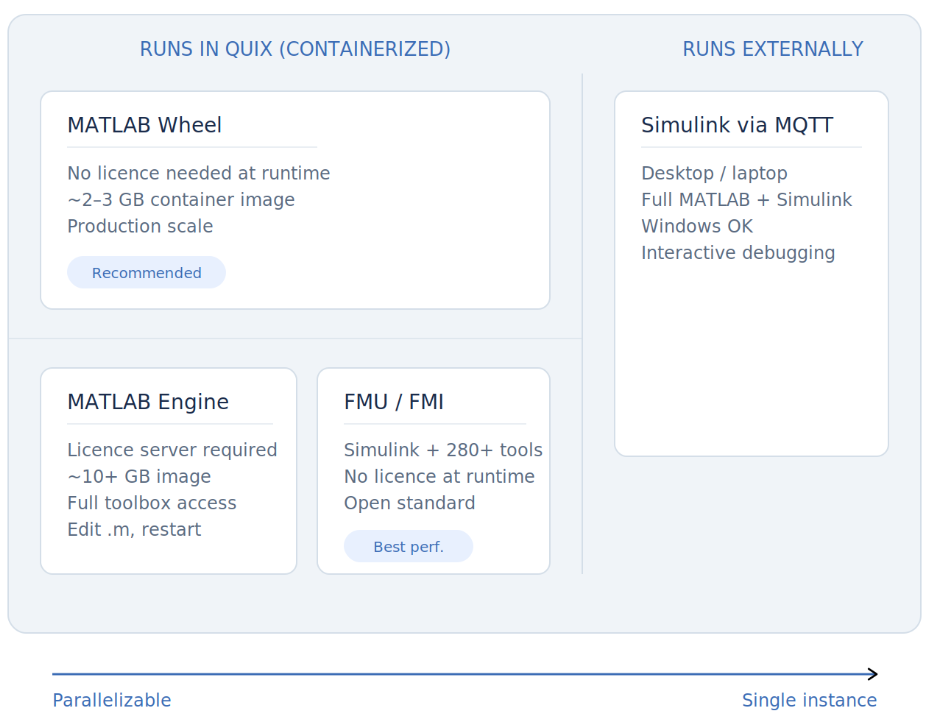
The three containerized methods (Wheel, Engine, FMU) are what make the Quix integration distinct from simply streaming data to an external MATLAB installation. When the model runs inside the pipeline, it becomes a scalable service: you can run multiple instances in parallel, each with dedicated CPU and memory, processing data from the same Kafka topic. This is how you go from "run the model once on my laptop" to "sweep 1,000 parameter combinations overnight."
Method 1: Compiled MATLAB Wheel
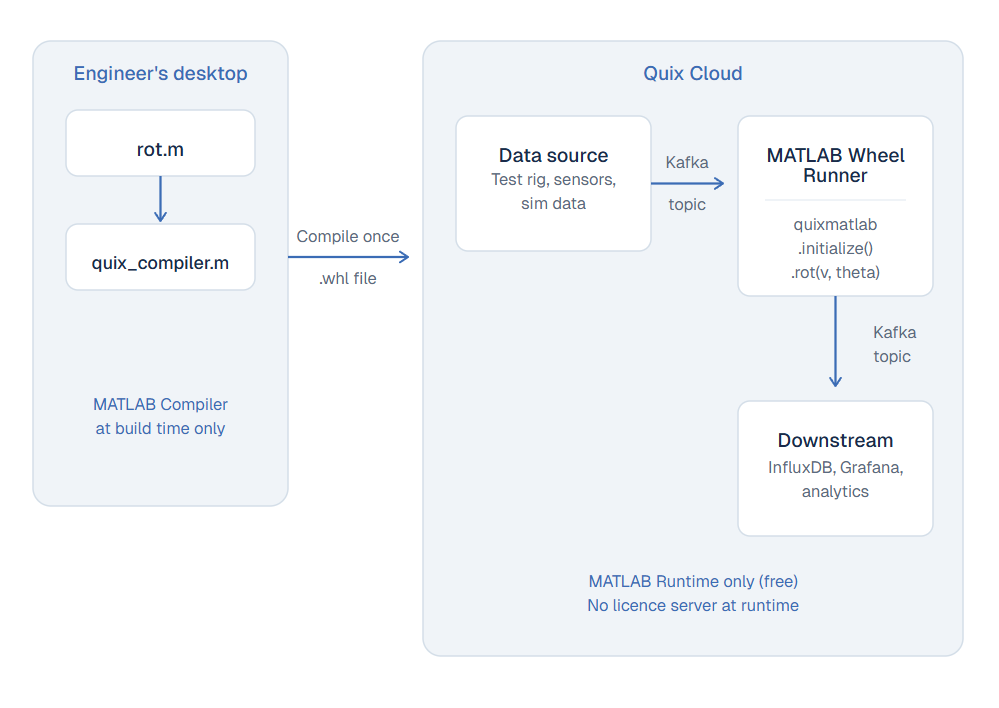
The most common path for production. MATLAB functions are compiled into Python .whl packages using MATLAB Compiler. At runtime, only the free MATLAB Runtime is required. You don't need a licence server, or full MATLAB installation to run it. The container image is roughly 2-3 GB.
We provide quix_compiler.m, which handles mcc invocation, setup.py generation, and wheel packaging in one step:
quix_compiler('rot', './output_folder')The compiled function is called from Python as a native method inside the Quix Streams processing loop:
from quixstreams import Application
import numpy as np
import quixmatlab

quixmatlab_client = quixmatlab.initialize()

def matlab_processing(row: dict):
    v = np.array([[row["x"]], [row["y"]]])
    theta = np.pi / 4
    output = quixmatlab_client.rot(v, theta)
    row["x_new"] = output[0][0]
    row["y_new"] = output[1][0]

app = Application(consumer_group="matlab_wheel", auto_create_topics=True)
sdf = app.dataframe(topic=app.topic(name=os.environ["input"]))
sdf = sdf.update(matlab_processing)
sdf.to_topic(app.topic(name=os.environ["output"]))
app.run()
- Strengths: Lightest deployment footprint. No licence server at runtime. Self-contained, reproducible, and horizontally scalable. If you need a thermal model, a signal filter, and a coordinate transform in the same pipeline, each runs as its own service with dedicated resources.
- Limitations: Not all MATLAB toolbox functions survive compilation. Every code change requires a recompile-and-redeploy cycle. The compiled output uses native NumPy arrays (which is usually an advantage), but means the type system differs from interactive MATLAB.
Method 2: Full MATLAB Engine
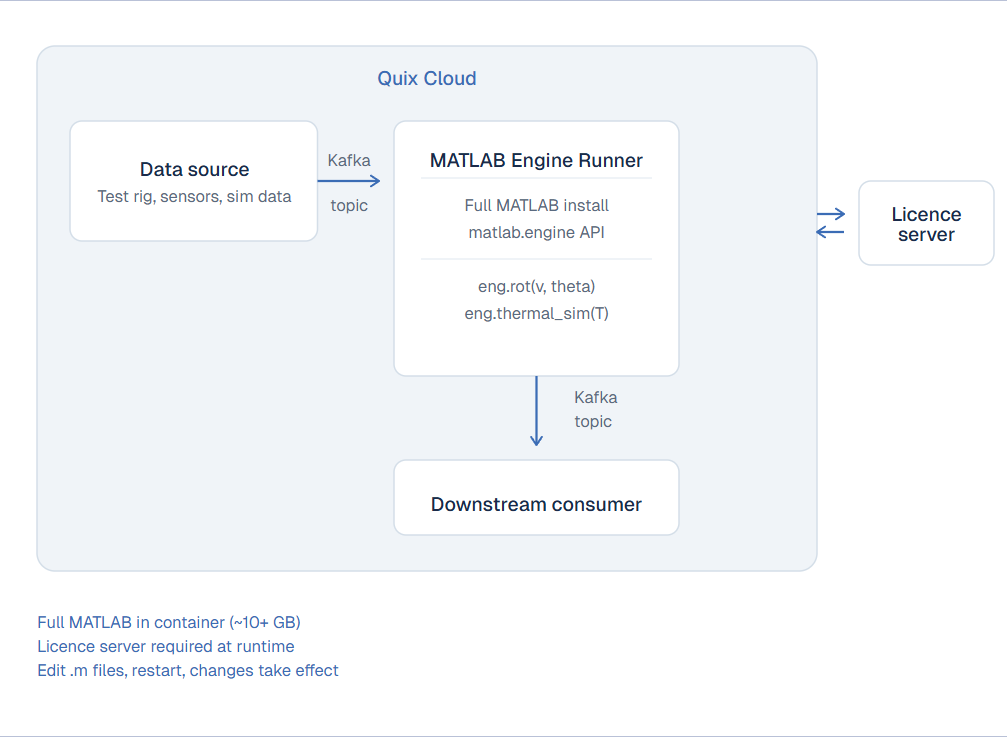
For teams actively developing .m files, or relying on toolboxes the MATLAB Compiler does not support. The full MATLAB installation runs inside a Docker container, and functions are called through the Engine API:
import matlab.engine

eng = matlab.engine.start_matlab()
v = matlab.double([[x], [y]])
output = eng.MATLAB.rot(v, theta)
- Strengths: Complete MATLAB ecosystem: every toolbox, interactive debugging, runtime evaluation. Changes to .m files take effect on container restart without recompilation. Ideal for active development and models that depend on toolbox functions the Compiler cannot handle. We provide templates for both MATLAB 2023b and 2025a.
- Limitations: Requires a licence server accessible from the deployment environment (MLM_LICENSE_FILE). The container image is ~10+ GB. Each running instance consumes a licence seat, which complicates horizontal scaling. Uses MATLAB-specific types (matlab.double) rather than native Python/NumPy arrays.
Method 3: FMU/FMI (Simulink and other simulation tools)
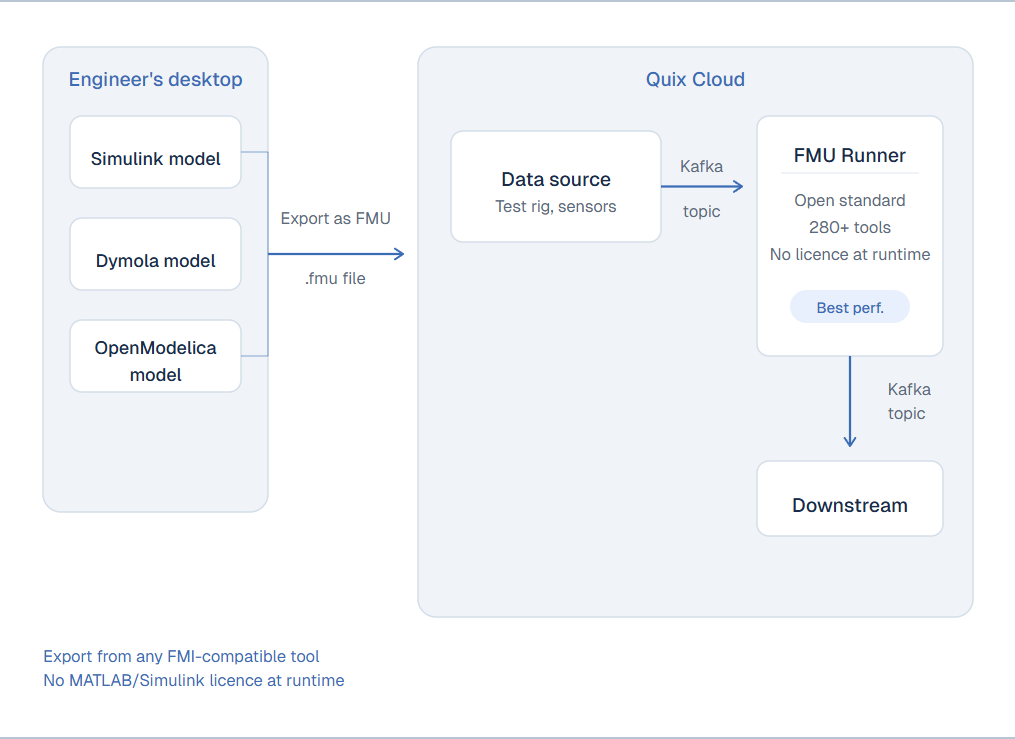
For Simulink models and other simulation tools, we support the Functional Mockup Unit standard via FMI. This is an open standard supported by over 280 modelling tools, making it a practical bridge between Simulink, Dymola, OpenModelica, and other environments. The exported FMU runs inside a Quix container without requiring a MATLAB or Simulink installation at runtime (you can find sample code in the Quix FMU runner repository).
- Strengths: Best execution speed of any containerized option for Simulink models (our benchmarks show FMU significantly outperforms the wheel approach). No licence at runtime. Vendor-neutral: the same pipeline can run FMUs exported from Simulink, Dymola, or OpenModelica side by side.
- Limitations: The FMU is a frozen snapshot. You cannot step into it, inspect intermediate states, or change solver settings without re-exporting from the source tool. Toolbox calls that happen during simulation (Signal Processing, Optimization, etc.) may not survive the export. The FMU is a standalone binary without the toolbox runtime. You are also locked to the solver configuration and step size chosen at export time. Not all Simulink models export cleanly, and pure MATLAB functions (.m files) have no FMU export path at all.
Method 4: Simulink via MQTT (desktop)
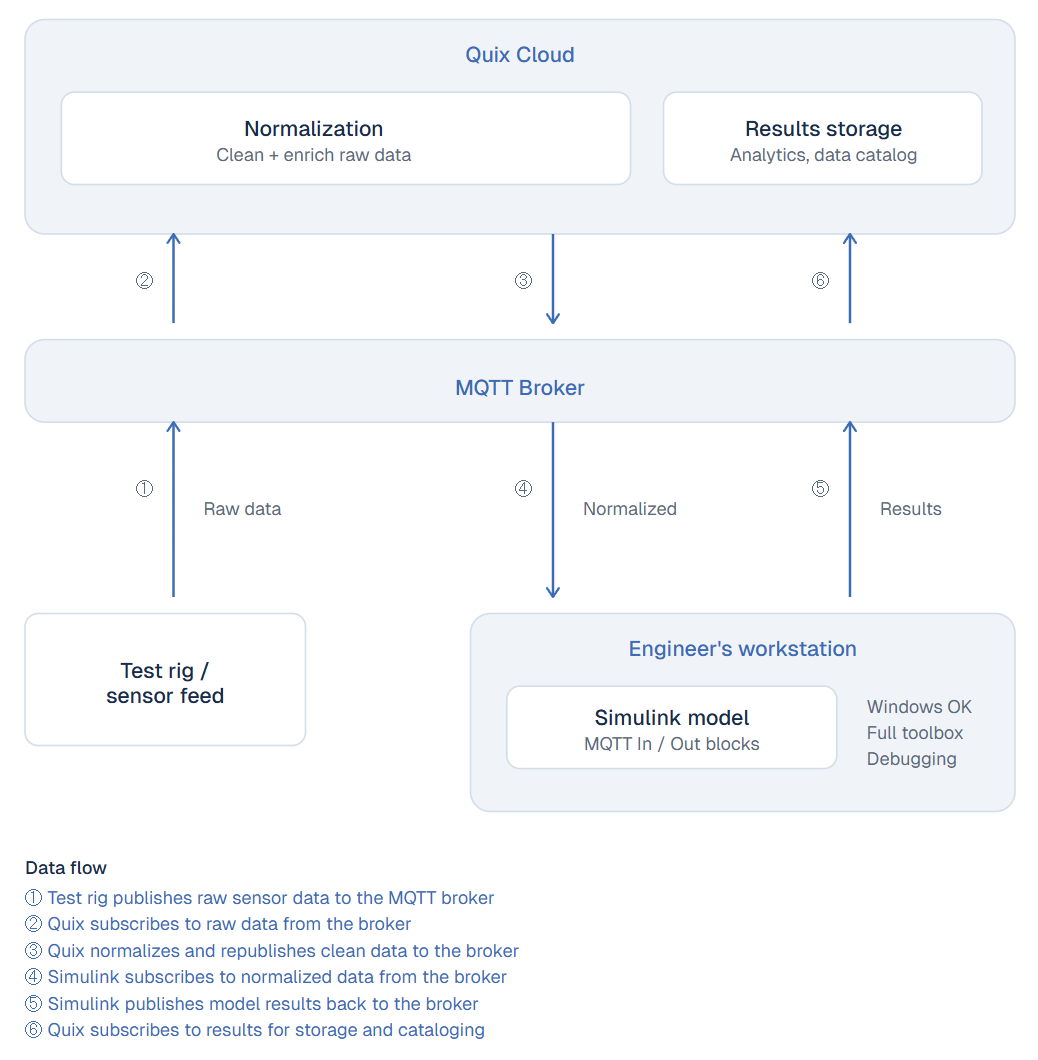
For teams running Simulink on local workstations (whether due to Windows dependencies, interactive development, or preference). Simulink runs wherever the engineer needs it, and Quix catalogs all inputs and outputs through MQTT.
- Strengths: Full Simulink desktop experience with no containerization constraints. Works on Windows. Full toolbox access and interactive debugging. The engineer's existing workflow is unchanged, Quix simply captures what goes in and comes out.
- Limitations: The simulation runs on a single machine, so there is no parallelization. Each Simulink model requires manual MQTT block configuration, which engineers can skip (meaning the business loses visibility into simulation I/O). This is also the only method where MathWorks code runs outside the Quix platform, so Quix cannot manage deployment, scaling, or resource allocation for the model itself.
Why running models inside the pipeline matters
The three containerized methods (Wheel, Engine, FMU) are what make the Quix integration distinct from simply streaming data to an external MATLAB installation. When the model runs inside the platform, it becomes a scalable service with dedicated CPU and memory. You can run multiple instances in parallel, processing data from the same Kafka topic via consumer groups. This is how teams move from running a model once on a laptop to processing live telemetry in real time or exploring a parameter space across many concurrent runs.
The same architecture supports both real-time and batch use cases. An F1 team running a vehicle dynamics model against live telemetry during a race. A battery manufacturer monitoring cell behaviour against a degradation model during accelerated life testing. An HVAC manufacturer validating a control algorithm against live test chamber data. In each case, the MATLAB model does what it was built to do. Quix provides the infrastructure to feed it data and capture its output at the speed and scale the business requires.
The partnership so far
This is not a new relationship. Our engineering teams have been working with MathWorks' consulting group on integration architecture. MathWorks' startup programme recently published a spotlight on Quix, covering how the platform eliminates data friction in engineering workflows.
As CEO Mike Rosam noted in that piece: "The support has been unrivalled. MathWorks went the extra mile, from account support, engineering support, even marketing support."
We have mutual customers using these integrations in production. F1 teams are operating digital twin models during live sessions, updating parameters as vehicle conditions change on track. Automotive OEMs are running MATLAB functions in Quix pipelines for real-time test data processing. The Connections Program formalizes what has been an organic technical and commercial collaboration.
Where we’re heading
We are actively working with MathWorks to improve our integrations. Expect to see the following improvements in the near future:
- Native Simulink connectivity. Today, streaming data between Quix and a running Simulink model requires configuring MQTT blocks manually. This works, but it places a setup burden on the engineer, and if they skip it, the business loses visibility into what the simulation produced. We are working toward first-class Quix I/O blocks for the Simulink library: dedicated source and sink blocks that connect directly to Quix topics without intermediate broker configuration. The goal is drag-and-drop connectivity.
- Improved Simulink compilation performance. Our benchmarking shows FMU export currently outperforms the Python wheel approach for Simulink models by a significant margin. We are working with MathWorks' technical team to close that gap, so teams that prefer the wheel workflow are not penalized on execution speed.
Get started
The MATLAB integration is available today as a project template you can deploy in Quix Cloud. The template includes:
- 2D Vector Data Source — generates test vectors and publishes them to a Kafka topic
- MATLAB Wheel Runner — processes streaming data using compiled MATLAB functions
- MATLAB Engine Runner (2023b / 2025a) — processes streaming data using the native MATLAB Engine
Deploy the template to see a working pipeline end to end. To use your own MATLAB function, replace the example rot.m and run:
quix_compiler('your_function', './output_folder')The resulting wheel drops into the existing Docker build and deploys through the standard Quix pipeline.
The FMU runner is available as a separate project template.
If you want to discuss how your MATLAB and Simulink workflows could run inside a data pipeline, book a call with our engineering team. We have built these integrations alongside customers running real models in production.
Last updated:
Apr 9, 2026

Check out the repo
Our Python client library is open source, and brings DataFrames and the Python ecosystem to stream processing.

Interested in Quix Cloud?
Take a look around and explore the features of our platform.
Interested in Quix Cloud?
Take a look around and explore the features of our platform.