How Quix helps to automate engineering workflows

Quix enables you to build small, containerized Python programs that continuously observe and act on incoming data. You can deploy these programs to the Quix Automation Engine instead of trying to run them as ad-hoc scripts on a local PC.

When every request for derived data has to go through a software developer

Your software developer wrote the connector between LabVIEW and the database. They deployed the Python scripts that generate the dashboards. When a performance engineer wants their MATLAB model running on live test data instead of exported CSVs, they come to the software team.

They know what the right architecture looks like. But building production-grade data infrastructure from scratch would take years with your current resources. And the enterprise vendors want six-figure contracts before you can get a pilot running.

Quix is the middle ground between DIY and enterprise

Stop tests automatically when you have the answer

Stream live data from test rigs or simulations.
Use Python-based processors to terminate or adjust tests the moment success or failure is clear, not hours later.

Automate test-to-simulation workflows

When a test completes a phase, automatically trigger simulation runs using actual measured values as boundary condition.
Validate model accuracy in real-time without waiting for post-test analysis

Automatically create test reports

Set up automations that generate fresh reports after a test completes.

Let humans spend more time making decisions, not manually collecting, cleaning and analyzing data with ad-hoc scripts.

Move from open-loop to closed-loop testing

After an initial test run, use the output data to dynamically adjust the parameters for subsequent runs.

Dramatically reduce the number of test iterations with dynamic parameter configuration.
Get a pilot running in days, not months

Week 1 — Setup

Your environment is ready for joint development. Quix ingests data from both high-frequency files (via a file listener) and databases.

Week 2 — Basic analytics

Your team can ingest raw metrics from the test machine. Using Python-based services, you can save high-quality run data to an analytics-ready data store.

Week 3 — Training

Your engineers learn how to run advanced analytics, test analytics on historic and live data, and build and deploy various analytics services on top of that data.

Week 4 — Evaluation

Your team understands how Quix solves your selected R&D problem and how to apply the same methodology to other use cases. They also have the data to make a business case that proves the ROI of better automation.

Example use case: Stopping a test when you have the answer

Suppose that you want to detect when the test is finished by looking for a certain signal in the data. You can create a program that listens for the right signal then automatically generate an interactive dashboard using the Quix Analytics module.

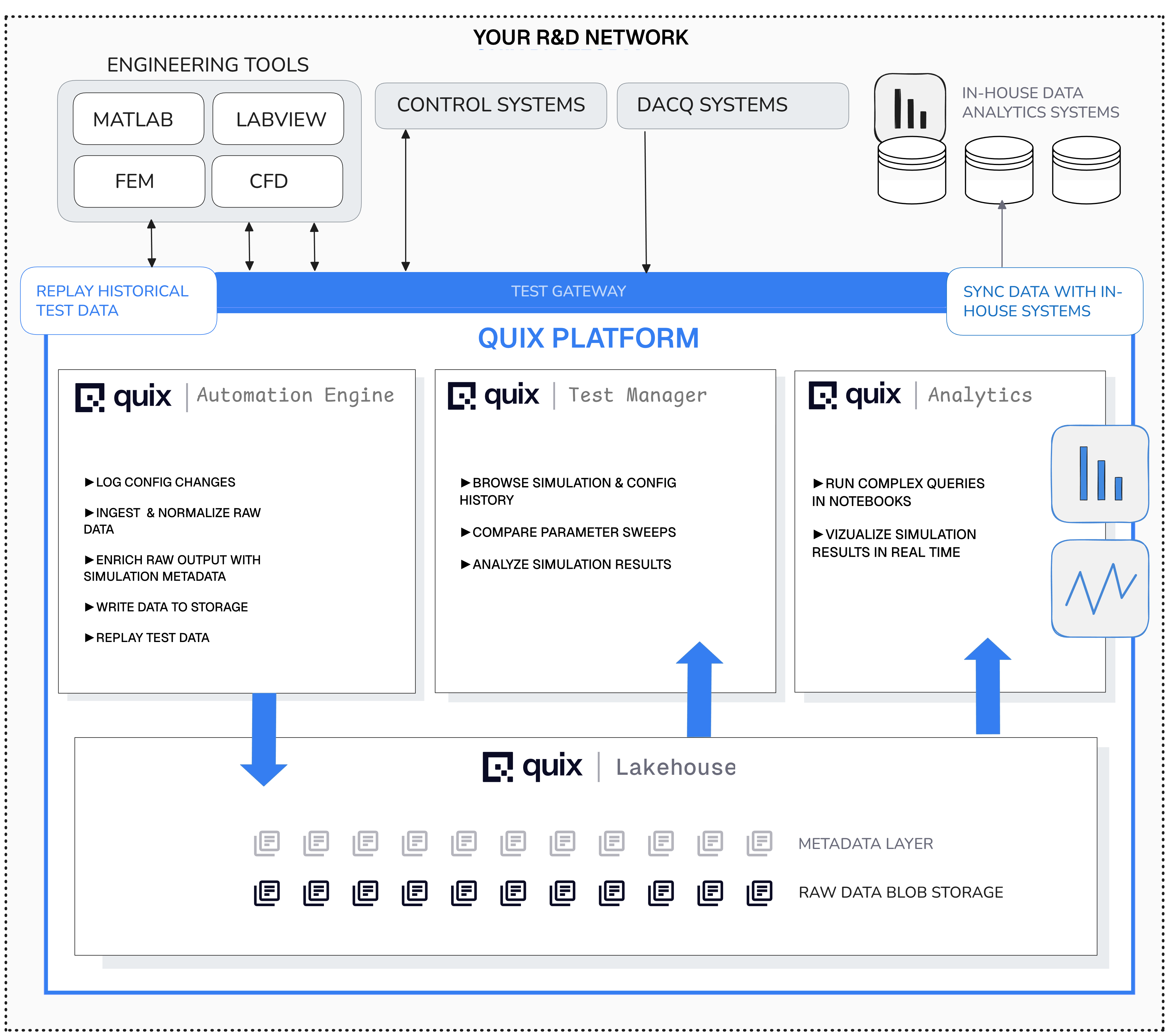
  • The Quix Dynamic Configuration Manager and Quix Test Manager automate the process of mapping metadata (configurations, signal dictionaries, etc.) to incoming raw data.
  • Once we connect your testing software to Quix, the platform can automatically detect when you are running a new test or simulation and tag the incoming data with the relevant metadata.

Key components

  • Automation Engine — Write and deploy containerized Python applications that can perform any task on your data.
    Use them to log config changes, ingest and normalize raw data, enrich with simulation metadata, write to storage, replay historical test data, and much more.
  • Test Manager — Browse simulation and config history, compare parameter sweeps, analyze simulation results
  • Analytics Suite— Run complex queries in notebooks, visualize simulation results in real time
  • Lakehouse—Store and query vast volumes of high-frequency, high resolution data in seconds.
Quix Architecture
Accelerating test and development at:
Case study